Developing and Deploying Custom BHI360 Firmware on the Sens Wear Platform
The BHI360 is different from a plain accelerometer or gyroscope because it is a sensor hub with its own processor, FIFO, boot flow, and virtual-sensor model. In practice, that means your wearable host firmware is not only reading raw motion data. It is also responsible for booting the BHI360, loading a firmware image, enabling the virtual sensors exposed by that image, and parsing the resulting FIFO events.
That architecture is exactly what makes the device powerful for wearables. It lets you move classification, fusion, and event detection closer to the sensor while keeping the Zephyr host focused on transport, power management, and application logic.
This article explains two things from the actual code in this workspace:
- How to take a custom BHI360 firmware image from Bosch’s firmware SDK workflow and package it for host-side use.
- How the Sens Wear platform’s integrated BHI360 is connected into the Zephyr firmware so that custom firmware can be uploaded, booted, and consumed by the application layer.
What “custom firmware” means for BHI360
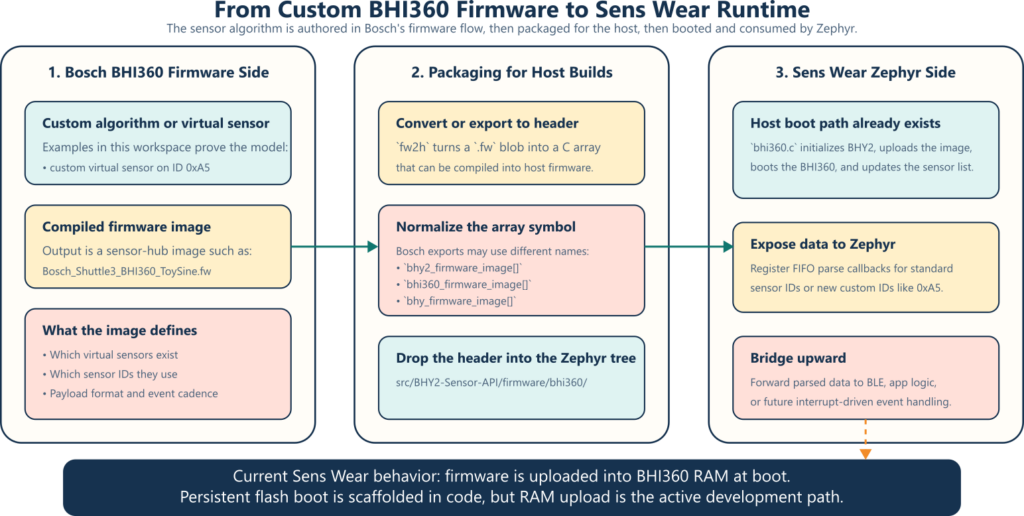
On BHI360, custom behavior does not start in the Zephyr application. It starts in a firmware image that runs inside the BHI360 itself. That image defines which virtual sensors exist, what IDs they use, what payload format they emit, and whether the host sees standard motion outputs, custom outputs, or both.
The workspace already shows that model clearly:
examples/load_firmware/load_firmware.cin: the Bosch BHI360 SensorAPI demonstrates the host-side boot and upload sequence.examples/virtual_sensor_toy_sine/virtual_sensor_toy_sine.c: demonstrates a custom firmware image that exposes a customer-visible sensor on ID0xA5.examples/fw2h/fw2h.cconverts a compiled binary firmware blob into a C header that can be compiled into host firmware.
The important architectural point is this: the Zephyr side does not “compile” the BHI360 algorithm. It consumes the generated firmware image. The Bosch-side authoring environment produces the .fw image, and the host repo packages and boots it.
The Bosch-side workflow
The Bosch examples reveal a practical development loop:
- Create or modify the BHI360 firmware image in Bosch’s firmware SDK flow.
- Export a compiled
.fwblob. - Convert that blob into a header if the host firmware wants to embed it.
- Boot the BHI360 with that image and confirm the expected virtual sensor IDs are present.
The custom example in this workspace makes that flow explicit. virtual_sensor_toy_sine.c is written to look for Bosch_Shuttle3_BHI360_ToySine.fw.h, then boot the sensor and subscribe to a custom sensor at 0xA5. In other words, the host application assumes the custom algorithm already exists in the firmware image and is now exposing a new FIFO event stream.
That is the right mental model for BHI360 development:
- The sensor-side image defines capability.
- The host-side code discovers and consumes that capability.
Converting a .fw blob into a host-embeddable header
The helper under examples/fw2h/fw2h.c exists for one simple reason: embedded host projects usually want to compile the sensor firmware blob directly into the application image.
Its output format is a C array, so the BHI360 firmware becomes just another static byte array in the build:

const unsigned char bhi360_firmware_image[] = {
/* ... firmware bytes ... */
};That makes iteration simple during development because the Zephyr image can upload the BHI360 firmware directly at boot without reading from external storage.
A detail that matters on Sens Wear: symbol names
One subtle issue in this workspace is that Bosch-generated headers do not all use the same array symbol name:
- Some BHY2 headers use
bhy2_firmware_image[]. - The BHI360
fw2h.chelper emitsbhi360_firmware_image[]. - The custom ToySine export in this workspace uses
bhy_firmware_image[].
The current Sens Wear Zephyr driver expects bhy2_firmware_image[] because its upload function calls:
uint32_t len = sizeof(bhy2_firmware_image);
rslt = bhy2_upload_firmware_to_ram_partly(&bhy2_firmware_image[i], len, i, incr, dev);So if your custom export uses another symbol name, normalize it before including the header. A thin wrapper is the cleanest way:
/* custom_bhi360_fw_wrapper.h */
#define bhy_firmware_image bhy2_firmware_image
#include "firmware/bhi360/Bosch_Shuttle3_BHI360_ToySine.fw.h"
#undef bhy_firmware_imageIf your export instead uses bhi360_firmware_image[], remap that name the same way:
#define bhi360_firmware_image bhy2_firmware_image
#include "firmware/bhi360/MyCustomImage.fw.h"
#undef bhi360_firmware_imageThis small normalization step prevents a very common integration failure: a perfectly valid firmware image that still does not build because the host upload code is looking for a different symbol name.
Validating the image with Bosch’s host examples
Before touching the Sens Wear Zephyr tree, it is worth proving that the firmware image boots correctly with the Bosch example flow.
The stock upload example shows the minimal sequence:
- Initialize the host interface.
- Soft-reset the BHI360.
- Read the chip ID.
- Configure host interrupt and interface settings.
- Check boot status.
- Upload the firmware in chunks.
- Boot from RAM.
- Read back the kernel version.
That is the shortest path to answer the only question that matters early on: “Is this image valid and bootable?”
The custom ToySine example then adds the next layer:
- Register a FIFO parse callback for the custom sensor ID.
- Update the virtual-sensor list.
- Check whether the custom sensor is actually present in the loaded image.
- Configure the sensor sample rate.
- Wait for data and parse the custom payload.
The Bosch example also shows the interrupt-gated consumption model used on the application board:
if (get_interrupt_status())
{
rslt = bhi360_get_and_process_fifo(work_buffer, sizeof(work_buffer), &bhy);
}That matters later when we compare it with the current Sens Wear integration, which is FIFO-driven but still host-polled rather than GPIO-interrupt-driven.
How the integrated BHI360 is wired into the Sens Wear Zephyr firmware
The Sens Wear firmware already contains the pieces needed to boot and consume a BHI360 image.
1. The build already includes Bosch’s BHY2 stack
CMakeLists.txt pulls in:
src/drivers/sensors/imu/bhi360.csrc/BHY2-Sensor-API/*.c- include paths for
src/BHY2-Sensor-API
That means the host-side upload, FIFO parsing, and virtual-sensor control APIs are already part of the Zephyr application build.
2. The board uses a Zephyr SPI bitbang bus for the BHI360
The Sens Wear board description defines the BHI360 on a zephyr,spi-bitbang bus. In the current DTS, the relevant mapping is:
P2.01as SPI clockP2.02as MISOP2.03as MOSIGPIO1.13as chip select, held deasserted high by a GPIO hog1 MHzmax SPI frequency for the BHI360 node
That is a conservative and debug-friendly starting point. It is not using the nRF hardware SPI controller yet, but it is enough to bootstrap the BHI360 reliably.
3. The Zephyr driver already performs the full boot sequence
The driver in src/drivers/sensors/imu/bhi360.c does the following inside initialize_imu():
- Calls
bhy2_init(...). - Calls
bhy2_soft_reset(...). - Retries product-ID reads until the device responds.
- Configures host interrupt and host interface control.
- Checks
bhy2_get_boot_status(...). - Uploads the firmware image in 256-byte chunks.
- Calls
bhy2_boot_from_ram(...). - Reads the kernel version.
- Updates the virtual-sensor list.
- Enables standard virtual sensors and registers FIFO callbacks.
That means Sens Wear already has a working BHI360 bootloader path. The main integration work for custom firmware is not inventing a new transport stack. It is adapting the image selection and the callback layer.

Replacing the stock image with a custom one
The current driver includes a stock Bosch firmware header:
#include "firmware/bhi360/BHI360_Aux_BMM150.fw.h"That header lives under:
src/BHY2-Sensor-API/firmware/bhi360/
So the clean replacement flow is:
- Copy your custom
*.fw.hintosrc/BHY2-Sensor-API/firmware/bhi360/. - Normalize the exported symbol name to
bhy2_firmware_image[]if needed. - Change the include in
src/drivers/sensors/imu/bhi360.cto your custom header or wrapper. - Rebuild the Zephyr application.
If your custom image still exposes the standard quaternion, linear acceleration, accelerometer, and gyroscope virtual sensors, the rest of the driver may continue to work with minimal changes.
If your image exposes a new custom sensor ID, then host-side parsing must be extended.
Connecting a custom BHI360 sensor to the Sens Wear application layer
There are two common integration cases.
Case 1: Your custom image still publishes standard virtual sensors
This is the easier path. If your firmware still exposes standard IDs such as:
BHY2_SENSOR_ID_GAMERVBHY2_SENSOR_ID_LACCBHY2_SENSOR_ID_ACCBHY2_SENSOR_ID_GYRO
then the current Sens Wear driver is already close to what you need. It registers callbacks for exactly those IDs and forwards quaternion and linear-acceleration data into the BLE bridge.
In that case, the job is mostly:
- replace the firmware image
- keep the same sensor IDs
- adjust sample rates or latency if needed
Case 2: Your custom image publishes a new custom sensor ID
This is the more interesting case, and the ToySine example in the Bosch SDK shows the pattern clearly with custom sensor ID 0xA5.
On Sens Wear, you would need to add the same pieces to the Zephyr driver:
- Define the custom sensor ID.
- Add a FIFO parse callback for that ID.
- Enable it with
bhy2_set_virt_sensor_cfg(...). - Parse the payload according to the format emitted by the firmware.
- Route the parsed data to the application layer, BLE, logging, or a Zephyr event path.
The host-side pattern looks like this:
#define MY_CUSTOM_SENSOR_ID 0xA5
static void parse_my_custom_sensor(const struct bhy2_fifo_parse_data_info *callback_info,
void *callback_ref);
rslt = bhy2_register_fifo_parse_callback(MY_CUSTOM_SENSOR_ID,
parse_my_custom_sensor,
imu,
&imu->bhy2);
rslt = bhy2_set_virt_sensor_cfg(MY_CUSTOM_SENSOR_ID, 25.0f, 0, &imu->bhy2);And inside parse_my_custom_sensor(...), you decode the payload bytes defined by your sensor firmware and convert them into something the rest of the platform can consume.
How Sens Wear forwards BHI360 data upward today
The current application flow is already organized in layers:
src/drivers/sensors/imu/bhi360.cboots the BHI360 and parses FIFO data.src/app/imu_ble_bridge.cregisters host callbacks with the driver.- The BLE bridge notifies BLE characteristics when streaming is enabled.
That means once your custom FIFO parser has produced a stable host-side structure, you can route it upward in the same pattern:
- driver callback
- bridge callback
- BLE service or internal application consumer
The existing bridge already does this for quaternion and linear acceleration. It only starts streaming when notifications are enabled, which is a good power-aware pattern for wearable telemetry.
Data delivery vs interrupt delivery on Sens Wear
This is the part that deserves the most precision.
The current Sens Wear implementation does configure the BHI360 host interrupt controls, but it does not yet wire the BHI360 INT pin into a Zephyr GPIO interrupt handler. Instead, the Zephyr IMU worker thread repeatedly calls:
bhy2_get_and_process_fifo(work_buffer, sizeof(work_buffer), &imu_devices[i].bhy2);when streaming is enabled.
So today the platform is:
- event-producing on the BHI360 side
- FIFO-parsing on the Zephyr side
- host-polled rather than GPIO-interrupt-driven
That distinction is important because the Bosch COINES examples do use the interrupt pin as a gate before pulling the FIFO, while the Sens Wear Zephyr code currently processes the FIFO from a worker thread.
The good news
The Sens Wear devicetree binding already supports:
int-gpiosreset-gpios
So the software architecture is not blocked. The current board node simply does not instantiate those properties yet.
What to do if you want true interrupt-driven custom firmware events
If your custom BHI360 firmware raises meaningful wakeup or event outputs, the next step on Sens Wear is straightforward:
- Add the BHI360 INT pin to the board DTS with
int-gpios. - Configure a Zephyr GPIO callback for that pin.
- Wake a worker thread or release a semaphore from the GPIO ISR.
- Call
bhy2_get_and_process_fifo(...)from thread context. - Keep parsing and application dispatch exactly as before.
That gives you the best of both worlds:
- low-power wakeup from the sensor hub
- safe FIFO parsing in thread context
- clean separation between transport, parsing, and application logic

RAM upload vs flash-based persistence
Another detail matters when people say “flash the firmware into the sensor.”
In the current Sens Wear repository, the active path is RAM upload at boot:
- the firmware image is compiled into the Zephyr app
- the host uploads it chunk by chunk
- the host calls
bhy2_boot_from_ram(...)
That is ideal during development because every Zephyr boot can load the newest BHI360 image without a separate provisioning step.
The driver also contains an unfinished flash-oriented path behind UPLOAD_FIRMWARE_TO_FLASH, but it is clearly marked with a TODO and still boots from RAM in the active configuration. So the accurate description for the current platform is:
- development-ready RAM upload exists now
- persistent sensor-side flash boot is scaffolded, but not the active Sens Wear path yet
If you later decide to make the firmware persistent on the sensor side, that should be treated as a second phase:
- verify that BHI360-accessible flash is present and correctly wired
- erase and program the correct flash region
- switch to
bhy2_boot_from_flash(...) - handle versioning and rollback carefully
For day-to-day algorithm iteration, RAM upload is the lower-risk and faster workflow.
A practical workflow for Sens Wear teams
If the goal is fast iteration on a custom motion algorithm, this is the workflow I would recommend:
- Build the custom BHI360 image in Bosch’s firmware SDK flow and export a
.fw. - Convert or package it as a
*.fw.hheader. - Normalize the exported symbol name to
bhy2_firmware_image[]. - Validate the image with the Bosch host example before touching Zephyr.
- Copy the header into
src/BHY2-Sensor-API/firmware/bhi360/. - Update the include in
src/drivers/sensors/imu/bhi360.c. - If the image uses standard sensors, keep the current host callbacks.
- If the image adds a custom sensor ID, register a new FIFO parse callback and route it into the Sens Wear app layer.
- Keep the current RAM upload flow while the algorithm is changing quickly.
- Add a real Zephyr GPIO interrupt path only after the payload format and event behavior are stable.
Final takeaway
The key advantage of the current Sens Wear codebase is that the hard part is already done: the platform already knows how to talk to the integrated BHI360, boot it, upload firmware into it, configure virtual sensors, parse FIFO data, and forward selected outputs into the application and BLE layers.
So developing a custom BHI360 solution for Sens Wear is not really about inventing a new transport. It is about owning three interfaces cleanly:
- the Bosch-side firmware image and sensor IDs
- the Zephyr-side firmware-image packaging and boot path
- the host-side parsing and app/BLE integration for the virtual sensors your image exposes
Once those three interfaces are kept explicit, the BHI360 becomes a very effective on-sensor computing node inside the Sens Wear platform rather than just another IMU on SPI.

No comment